Showing posts with label Electronics. Show all posts

Tuesday, February 24, 2026

Thursday, December 11, 2025

FIELD DIAGNOSTIC — “HONEST LINK TEST


MARK’S FIELD DIAGNOSTIC — “HONEST LINK TEST”

Purpose:
Run three real-world tests that expose the true condition of a network link (jitter, loss, routing stability, sustained throughput).
Replaces Speedtest completely.


COMMAND BLOCK (copy/paste and run as-is)

# 1. Stability & packet loss (50 probes to Cloudflare) ping -c 50 1.1.1.1 # 2. Route quality (live traceroute + loss/jitter per hop) mtr -rw 1.1.1.1 # 3. Sustained throughput test (TCP, real flow) iperf3 -c iperf.scottlinux.com

INTERPRETATION (brief)

1. ping

  • 0% loss + tight latency → good link

  • Loss > 1% → unstable

  • Jitter swings > 30 ms → VPN, STT, games, Zoom all degrade

  • “Destination Net Unreachable” → upstream routing failure (tower/backhaul dead)


2. mtr

  • Shows where packets die.

  • Loss at hop 1 = tower or local NAT failure

  • Loss at hop 2–3 = backhaul congestion/microwave link fault

  • Loss only at far hops = upstream ISP issues

This is the “forensic” tool.


3. iperf3

  • Tests real, sustained throughput — no cheating, no smoothing.

  • Smooth graph → link can carry load

  • Bursts/stalls → congestion or jitter

  • Disconnects → upstream failure

If iperf3 can’t connect at all → the link isn’t routing.


CONCLUSION

This triple test reveals:

  • jitter

  • packet loss

  • route instability

  • tower congestion

  • backhaul collapse

  • VPN viability

  • torrent viability

  • STT reliability

  • true usable bandwidth

Speedtest hides all of these.
This rig exposes them instantly.


---------------------------------------------------------------------------------------------------------------

Righto — here’s your compact, portable field-diagnostic script.
Name it whatever you like; I’ll call it netcheck for simplicity.

This gives you:

  • one command

  • clean output

  • no dependencies beyond mtr and iperf3 (install once)

  • works anywhere


1. The Script (netcheck)

Copy/paste this into a file:

#!/bin/bash echo "====================================" echo " Mark's Honest Link Test – netcheck " echo "====================================" echo # ---- 1. PING TEST ---- echo "[1] PING: Stability + Loss" echo "--------------------------" ping -c 50 1.1.1.1 echo echo # ---- 2. MTR TEST ---- echo "[2] MTR: Route Quality (loss per hop)" echo "--------------------------------------" mtr -rw 1.1.1.1 echo echo # ---- 3. IPERF3 THROUGHPUT ---- echo "[3] IPERF3: Sustained Throughput Test" echo "--------------------------------------" iperf3 -c iperf.scottlinux.com echo echo "Done."

2. How to install it

Save it somewhere sensible — I’d suggest:

~/bin/netcheck

Then make it executable:

chmod +x ~/bin/netcheck

If ~/bin isn’t already in your PATH, add it by editing ~/.bashrc:

echo 'export PATH="$HOME/bin:$PATH"' >> ~/.bashrc source ~/.bashrc

3. How to run it

Anytime, anywhere:

netcheck

That’s it.
No mucking around.
It runs the three honest tests in sequence:

  • ping → stability

  • mtr → route diagnosis

  • iperf3 → sustained usable throughput

You get a complete truth readout of the link without touching Speedtest or any GUI.


4. Notes

  • If mtr or iperf3 aren’t installed, do this once:

sudo apt install mtr iperf3
  • If iperf3’s test server is ever unreachable (rare), swap in Cloudflare’s:

iperf3 -c speedtest.wobcom.de

But the default one is rock solid.


If you want a version that logs automatically to a timestamped file for later analysis, I can package that too.


Tuesday, October 21, 2025

AI Assistant.

 chatGPT

whisper


Schumann scope toy

 NOAA ? Online Readl time observatories 


Low Frequency High Gain Amp Raw signal aprox 10 pV ... probbably too low to monitor with afforadable electronics. 

Thursday, January 16, 2025

K5528 • Currawong Valve Amplifier - made me an offer I couldnt refuse

https://www.altronics.com.au/p/k5528-currawong-2x10-watt-stereo-valve-amplifier-kit/

Made me an offer I cant remember - cuppla hundred bucks due water damage on the box.  ..

Silicon Chip Online Issue - November 2014 

Silicon Chip Online Issue - December 2014

I buy these to build the speakers with these drivers.  First made in July 22.

 DAEX58FP

 Idea which I considered. A Pi Audio Hat

https://core-electronics.com.au/raspberry-pi-iqaudio-dac-pro-48159.html

Raspberry Pi IQaudio DAC Pro

SKU: CE07563

https://www.max2play.com/en/2016/01/raspberry-pi-zero-with-iqaudio-dac/ https://www.sparkfun.com/products/17738

Decided not to. It is too complicated to get the audio to it. Perhaps .wav files to get proper Hi Fi Audiophile cred? Not worth it. 


FAULT : Both channels intermittently becoming quite and distorted. 

When i tried to power the Wi Fi  source from a USB source there was a huge hum so i just temporarily powered it off a battery pack.  This time i should derive the Power from the 12 Volt DC heater line and that way there are no external earths. 

 The audio input needs to be wired to the in/out panel.  

Fixed that and biffed out that horrible bluetooth abomination i had and relpaced it with an automotive one.. Deriving the 12 volt from the heater voltages.


Much Much nicer but these snot green planar "speakers' still sound terrible. And very quiet. 

I have some scrap speakers to test out but probably best I aim to get some twin code old school efficient conventional speakers. They are slightly better bass but still very quiet at full volume.

FAULT : The 330 Ohm 5 watt resistors are cooked. 

I left out a link .. I did put a link on LK4 / 5 which complete the feedback loop presumably can remove them for testing. The links I left out are next to them.

https://www.diyaudio.com/community/threads/silicon-chip-mag-currawong-amp.264057/page-4?utm_source=chatgpt.com

Wednesday, May 29, 2024

Batteries... the 24 volt Lead Acid replaced by LiFePO4.

24V EVE 230Ah 5.89kWh LiFePO4 Battery Pack Kit with Smart BMS

https://lifepo4oz.com/

is installed and Running.

Step-by-Step Guide: Setting Up Your Daly BMS with LiFePO4 Oz

 Fault : I had a flood which shut down the BMS. After it was dried out it worked again ..  I blew up the 24 to 12 volt module probably by having 12 volt on the line but zero on the 24.   Not fail safe - Beware.

The BMS also "forgets" the SOC and thinks it is 100 percent once it comes back up.

Recalibration is :          Cell Characteristics > SCO Set to 50 percent. 

Charge till 28 volts. (Not 28.6 - too high can be set         Protection parameters >sum volt high protect).

SCO Set to 100Percent.  

BMS Software           Can run on Wine (wouldnt using Synaptic) or on Google / Apps Linux

Stack Compression?   No One thinks this is necessary.

 Some assert the pile should be restrained with threaded Rod or springs .. the kits supplier thinks it is unnecessary.  If it were i would expect to see a spec in the Operating section.  The Compression Spec is in the destructive batch testing section.

The construction of the battery pack will need to be researched. There needs to be some rigidity / compression in the pack because according to some,  failing this the battery packs will swell during charge and this deformation will damage them. 

https://lifepo4oz.com/collections/lifepo4-battery-kits/products/24v-eve-280ah-lifepo4-7-17-kwh-battery-pack-kit-with-smart-bms

Compression Testing Spec  

Ref Page 19

https://batteryfinds.com/wp-content/uploads/2023/09/EVE-LF280K-280Ah-3.2V-LiFePO4-Prismatic-Battery-Cell-SpecificationDatasheet.pdf

Gives the dimensions of a test rig and then specifies the maximum pressure (swelling) the cell should exert to pass the test.  I doesnt seem to refer to the design of a working battery pack. 


Friday, November 10, 2023

ESP 32 4 / 8 Relay MQTT Module.

UPDATE : 
 
I dont like the protoboard / bird's nest approach. 
 
There are 8 channel relay boards with ESP 32 available at very afffordable prices. Much nicer way to go.   30 bucks and wouldnt have to buggerise around with connectors... Just use those staright pins crimps in the screw block ... all round winner.
 
 
-------------------------------------------------------------------------------------------------------
 
Have just built an 8 channel version of the hardware. Time to revisit the sketch and modify it for the new board. Even better make a sketch that will work on both. 

 Ref : https://randomnerdtutorials.com/esp32-relay-module-ac-web-server/

 Hacked the sketch to give three extra channels and set up a Node Red Interface ... 


/*********
MQTT Relay Driver

Rui Santos
Complete project details at https://randomnerdtutorials.com
Ref: Learning ESP32 with ArduinoIDE page 358
Modified to remove push button and to add 4 relays instead of the LED - Mark Bolton September 28 2021
*********/

#include <Arduino.h>

#include <WiFi.h>
extern "C" {
#include "freertos/FreeRTOS.h"
#include "freertos/timers.h"
}
#include <AsyncMqttClient.h>
#include <OneWire.h>
#include <DallasTemperature.h>

// Change the credentials below, so your ESP32 connects to your router
#define WIFI_SSID "Mark_Network"
#define WIFI_PASSWORD "er1amjhwif"

// Change the MQTT_HOST variable to your Raspberry Pi IP address,
// so it connects to your Mosquitto MQTT broker
#define MQTT_HOST IPAddress(192, 168, 1, 105)
#define MQTT_PORT 1883

// Create objects to handle MQTT client
AsyncMqttClient mqttClient;
TimerHandle_t mqttReconnectTimer;
TimerHandle_t wifiReconnectTimer;

unsigned long previousMillis = 0; // Stores last time temperature was published
const long interval = 10000; // interval at which to publish sensor readings

// Assign output variables to GPIO pins

const int output25 = 25; // GPIO where the Relay is connected to
const int output26 = 26;
const int output27 = 27;
const int output33 = 33;

// GPIO where the DS18B20 is connected to
const int oneWireBus = 32;
// Setup a oneWire instance to communicate with any OneWire devices
OneWire oneWire(oneWireBus);
// Pass our oneWire reference to Dallas Temperature sensor
DallasTemperature sensors(&oneWire);

void connectToWifi() {
Serial.println("Connecting to Wi-Fi...");
WiFi.begin(WIFI_SSID, WIFI_PASSWORD);
}

void connectToMqtt() {
Serial.println("Connecting to MQTT...");
mqttClient.connect();
}

void WiFiEvent(WiFiEvent_t event) {
Serial.printf("[WiFi-event] event: %d\n", event);
switch(event) {
case SYSTEM_EVENT_STA_GOT_IP:
Serial.println("WiFi connected");
Serial.println("IP address: ");
Serial.println(WiFi.localIP());
connectToMqtt();
break;
case SYSTEM_EVENT_STA_DISCONNECTED:
Serial.println("WiFi lost connection");
xTimerStop(mqttReconnectTimer, 0); // ensure we don't reconnect to MQTT while reconnecting to Wi-Fi
xTimerStart(wifiReconnectTimer, 0);
break;
}
}

// Add more topics that want your ESP32 to be subscribed to
void onMqttConnect(bool sessionPresent) {
Serial.println("Connected to MQTT.");
Serial.print("Session present: ");
Serial.println(sessionPresent);
// ESP32 subscribed to esp32/relay topic
uint16_t packetIdSub = mqttClient.subscribe("esp32/relay", 0);
Serial.print("Subscribing at QoS 0, packetId: ");
Serial.println(packetIdSub);
}

void onMqttDisconnect(AsyncMqttClientDisconnectReason reason) {
Serial.println("Disconnected from MQTT.");
if (WiFi.isConnected()) {
xTimerStart(mqttReconnectTimer, 0);
}
}

void onMqttSubscribe(uint16_t packetId, uint8_t qos) {
Serial.println("Subscribe acknowledged.");
Serial.print(" packetId: ");
Serial.println(packetId);
Serial.print(" qos: ");
Serial.println(qos);
}

void onMqttUnsubscribe(uint16_t packetId) {
Serial.println("Unsubscribe acknowledged.");
Serial.print(" packetId: ");
Serial.println(packetId);
}

void onMqttPublish(uint16_t packetId) {
Serial.println("Publish acknowledged.");
Serial.print(" packetId: ");
Serial.println(packetId);
}

// You can modify this function to handle what happens when you receive a certain message in a specific topic
void onMqttMessage(char* topic, char* payload, AsyncMqttClientMessageProperties properties, size_t len, size_t index, size_t total) {
String messageTemp;
for (int i = 0; i < len; i++) {
//Serial.print((char)payload[i]);
messageTemp += (char)payload[i];
}
// Check if the MQTT message was received on topic esp32/relay
if (strcmp(topic, "esp32/relay") == 0) {
if (messageTemp == "1on") {
digitalWrite(output25, LOW);
}
else if (messageTemp == "1off") {
digitalWrite(output25, HIGH);
}
else if (messageTemp == "2on") {
digitalWrite(output26, LOW);
}
else if (messageTemp == "2off") {
digitalWrite(output26, HIGH);
}
else if (messageTemp == "3on") {
digitalWrite(output27, LOW);
}
else if (messageTemp == "3off") {
digitalWrite(output27, HIGH);
}
else if (messageTemp == "4on") {
digitalWrite(output33, LOW);
}
else if (messageTemp == "4off") {
digitalWrite(output33, HIGH);
}
}
Serial.println("Publish received.");
Serial.print(" message: ");
Serial.println(messageTemp);
Serial.print(" topic: ");
Serial.println(topic);
Serial.print(" qos: ");
Serial.println(properties.qos);
Serial.print(" dup: ");
Serial.println(properties.dup);
Serial.print(" retain: ");
Serial.println(properties.retain);
Serial.print(" len: ");
Serial.println(len);
Serial.print(" index: ");
Serial.println(index);
Serial.print(" total: ");
Serial.println(total);
}

void setup() {
// Start the DS18B20 sensor
sensors.begin();
// Define Relay Ouput as an OUTPUT and set it LOW
pinMode(output25, OUTPUT);
digitalWrite(output25, LOW);
pinMode(output26, OUTPUT);
digitalWrite(output26, LOW);
pinMode(output27, OUTPUT);
digitalWrite(output27, LOW);
pinMode(output33, OUTPUT);
digitalWrite(output33, LOW);
Serial.begin(115200);

mqttReconnectTimer = xTimerCreate("mqttTimer", pdMS_TO_TICKS(2000), pdFALSE, (void*)0, reinterpret_cast<TimerCallbackFunction_t>(connectToMqtt));
wifiReconnectTimer = xTimerCreate("wifiTimer", pdMS_TO_TICKS(2000), pdFALSE, (void*)0, reinterpret_cast<TimerCallbackFunction_t>(connectToWifi));

WiFi.onEvent(WiFiEvent);

mqttClient.onConnect(onMqttConnect);
mqttClient.onDisconnect(onMqttDisconnect);
mqttClient.onSubscribe(onMqttSubscribe);
mqttClient.onUnsubscribe(onMqttUnsubscribe);
mqttClient.onMessage(onMqttMessage);
mqttClient.onPublish(onMqttPublish);
mqttClient.setServer(MQTT_HOST, MQTT_PORT);

connectToWifi();
}

void loop() {
unsigned long currentMillis = millis();
// Every X number of seconds (interval = 5 seconds)
// it publishes a new MQTT message on topic esp32/temperature
if (currentMillis - previousMillis >= interval) {
// Save the last time a new reading was published
previousMillis = currentMillis;
// New temperature readings
sensors.requestTemperatures();

// Publish an MQTT message on topic esp32/temperature with Celsius degrees
uint16_t packetIdPub2 = mqttClient.publish("esp32/temperature", 2, true,
String(sensors.getTempCByIndex(0)).c_str());
// Publish an MQTT message on topic esp32/temperature with Fahrenheit degrees
//uint16_t packetIdPub2 = mqttClient.publish("esp32/temperature", 2, true,
// String(sensors.getTempFByIndex(0)).c_str());
Serial.print("Publishing on topic esp32/temperature at QoS 2, packetId: ");
Serial.println(packetIdPub2);

}
}


Thursday, March 2, 2023

Home Automation

My ESP 32 based node on the Front Driver's side blew up when I hooked up a light to it and the light had an intermittant short. The ESP 32 just turns all the relays on. I am using it manually ATM.

Either the program is corrupted or the ESP 32 bricked. Either way amounts to much the same thing. 

I also built a second controller to take care of the lights on the LHS of the truck. 

I have also to install Arduino IDE on my NUC and get that running. 

Everytime I do this I forget the steps involved.  

Arduino IDE 2.0 Installation notes. 

https://www.youtube.com/watch?v=pLrKYRsJ3Eo

https://github.com/TheAssassin/AppImageLauncher/releases


Error compiling "blink" 

How to Solve Python ModuleNotFoundError: no module named ‘serial’

https://www.pythonreader.com/2022/08/itsmycode-modulenotfounderror-no-module_76.html

All 4 ESP32 upoaded the sketch, so the ESP 32 based node on the Front Driver's side was not "bricked" but the compiled sketch was corrupted.

I cant find the sketch anywhere so will probably have to rewrite it.  :-(


ATOM Diy module - Passive Electronic Breaker for Small Motors.

https://www.electro-tech-online.com/threads/atom-diy-module.142530/


BOM  / Altronics Equivalents - Dont appear to be any - the Zeners are all power supply types and the NPN Darlington is Vceo 100 Volts

Q2 : BC337 

Q1 : 2SD1071 Silicon NPN Darlington Power Transistor

https://www.datasheetbank.com/2SD1071-Datasheet-PDF-Iscsemi

D1 : 15KE200A / IN6303A "MOSORB" 1500 Watt Mosorb™ Zener Transient Voltage Suppressors

 https://www.datasheetbank.com/IN6303A-Datasheet-PDF-ON-Semiconductor

Thursday, October 21, 2021

Bangood Sensors


KY-026 IR flame sensor - SKUA60847

Laser Receiver Module - SKU 114338

DS18B20 DC 5V Digital Temperature Sensor Module - SKU134751

5V 30A ACS712 Ranging Current - SKU089867

DC 12V Delay Relay Shield NE555 Timer - stk0152002490

3Meters Waterproof Temperature Sensor Probe For DS18B20 DS1820 Detector

CCS811 HDC1080 CO2 temperature and humidity VOCs air quality sensorboardmodut8 

https://www.amazon.com/MagiDeal-Shield-Switch-Adjustable-Module/dp/B01K7CSPFM

Friday, August 20, 2021

Home Automation - Pi Hub

I was very happy with the centralized Pi based Smart Truck / openHAB architecture. 

Alas leaky roofs and monsoons were too much for the system and I have been using paleolithic switches to turn my lights on and off.

I am planning a system that uses a headless Pi and remotely located ESPxx communicating using MQTT and node red.

It should be far more flexible. Involve a lot less copper and be much more tractable when it comes to custom applications. I dont care how pretty the UI is. 

"And so ... (to coin a phrase) lets get started." 

I started with a fresh install of Kubuntu 21.04. Ubuntu had been buggy and annoying whereas last time used Kubuntu it seemed a lot less cluttered. I want this project to be focused slow and thorough. The roof still leaks so the ceiling project must proceed accordingly but the electronics can be deployed prior. 

Kunbuntu is being a bit naughty. 

Connection is buggy - speed is fine but it keeps dropping out Deactivating and asking for the password. The password doesn't have to be reentered. Just click through. Going to try a slow Torrent to see if it is a workaround. Transmission isnt used in Kubuntu. Ktorrent is the client. It looks good but I haven't used it before. 

Arduino IDE wont launch. Not just me apparently - reports of this from IDE 2.0. I dont know what version Discovery installs.

now..

Ktorrent wont launch.  Ktorrent did launch as the application for the Kubuntu LTS download and I throttle it back to 100kBps (10 hour d/l) to see if the Network will stay active. So far so good after half an hour.


Build a Developer's Linux Workstation - Complete Guide

I will build this on the NUC. 

error: /boot/vmlinuz-4.4.0-141-generic has invalid signature.
error: you need to load the kernel first.

On attempt boot from USB.   

Disable Secure Boot. 

BIOS on NUC -


Press F2 during boot to enter BIOS Setup.

Turned off secure boot Boot menu. - now displays Ubuntu Menu and them screen goes blank and activity on USB for a few seconds then hangs.   

Will go on to boot off openSUS if the boot order is changed in the BIOS.

Ubuntu install just wouldn't. I chucked in the Kubuntu USB and it installed hitchless. I didnt opt for secure boot or third party software since this is supposed to be a strapped down development install.

So crazy so soon?


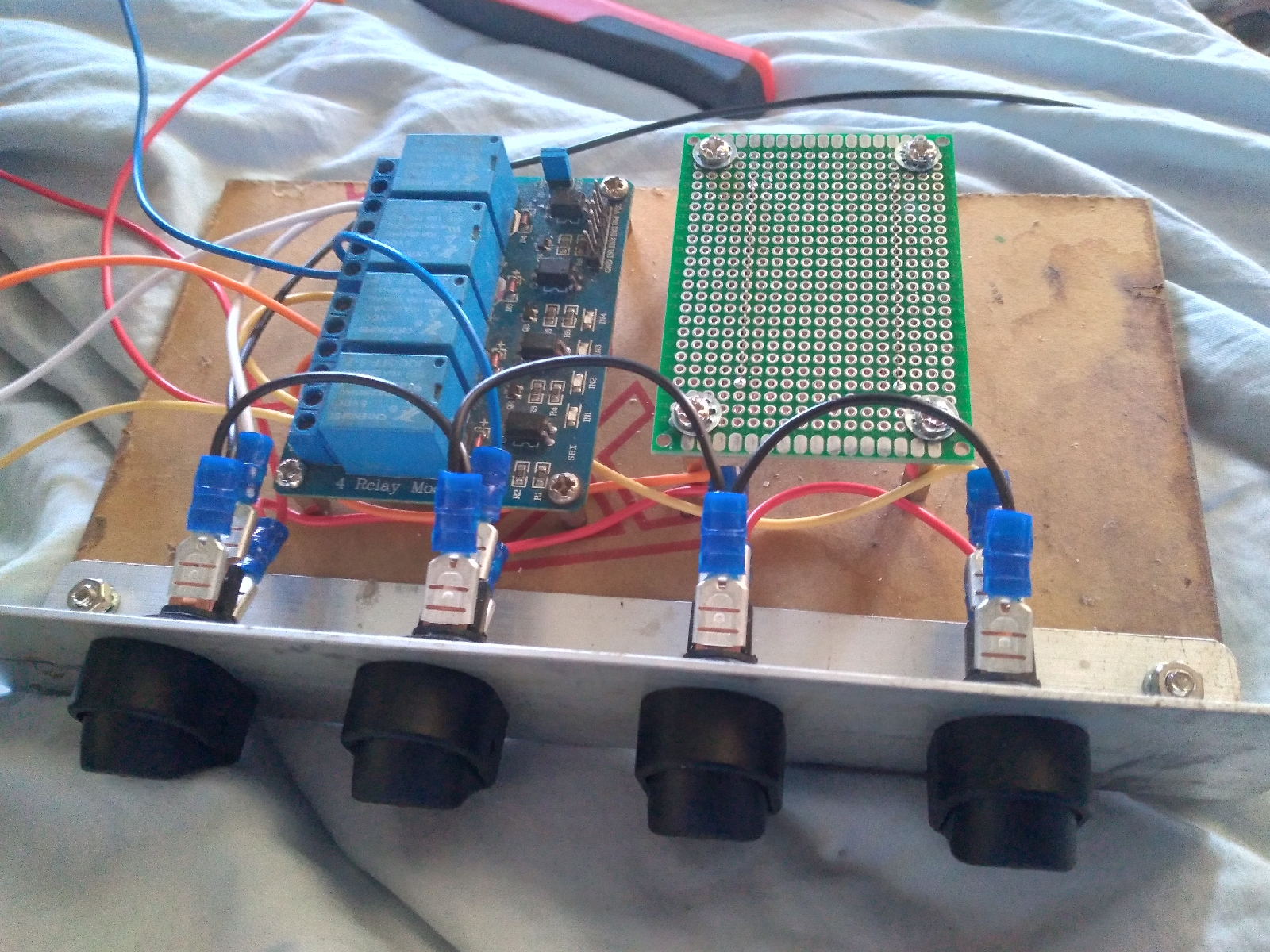
On my switch panel I am using the Jaycar SK0955 switch which I thought was SPDT and hence would have cause shorting problems trying to parallel it with the relay to give an OR type switching.  I measured it and it wont. I should have read the maker's sheet. I have used a stupidly huge number of spades to get the wiring I needed. Mainly because I want to be able to disconnect each light separately. I will probably have to solder onto the tongues of the switches to get the relay tidily into the circuit. 

Downloaded Raspbery Pi OS Lite ( fmrly Raspbian).  

Wont instal Etcher - Make Startup Disk should work.

N: Updating from such a repository can't be done securely, and is therefore di
sabled by default.

Scanned IPs;

IP:    192.168.1.101
Ping:    38 ms
Hostname:    HP.local
Ports:    [n/a]

IP:    192.168.1.103
Ping:    0 ms
Hostname:    NUC
Ports:    [n/a]

IP:    192.168.1.104
Ping:    2 ms
Hostname:    raspberrypi.local
Ports:    [n/a]


Enable SSH - created a ssh file in the boot sector of the SD card.

Enable WiFi. 


Hardware :  


Relay Board


GND                  Brown

GPIO   4 - IN1      Pin 4

GPIO   17  - IN2    6

GPIO   27  - IN3    7

GPIO  22 - IN4   8

GPIO  9 - IN5   11

GPIO  5 - IN6    15

GPIO  6 - IN7    16

GPIO  13 - IN8    17

VCC                    RED

Node Red Installed 

http://192.168.1.105:1880

Add Node to Reboot / Shutdown

npm install node-red-contrib-rpi-shutdown

Add DHT22 Node

Temp / Humidity 

Fault ; The above method didnt give a temperature ... The output was "undefined" .. I removed the filter msg.payload = msg.temperature node and it worked. I lost interest trying to get the entire string ouput from the Pi.  Dont want to get too far down in the weeds.